

Bring the context together.
Bring email and connected chats into the work, including Teams and Slack. Talk to your agent or let your Voice Rep handle real calls, with context close at hand.
BizKey’s own AI agent platform brings email, chat, calls, and commitments into one workspace. Your assistants prepare the next step and bring important decisions back to your team. Available through a demo and guided setup.
YOUR EXECUTIVE ASSISTANT
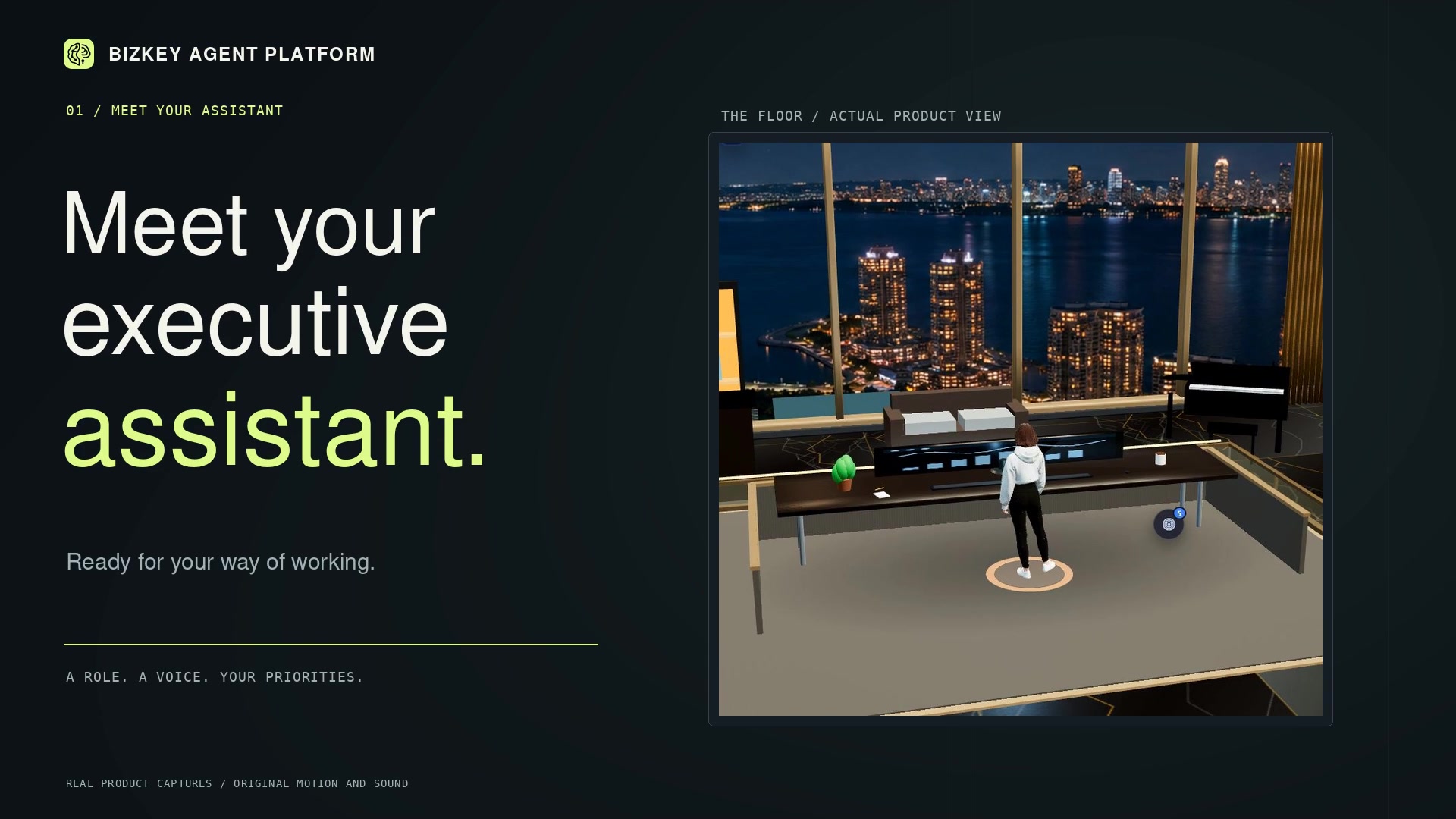
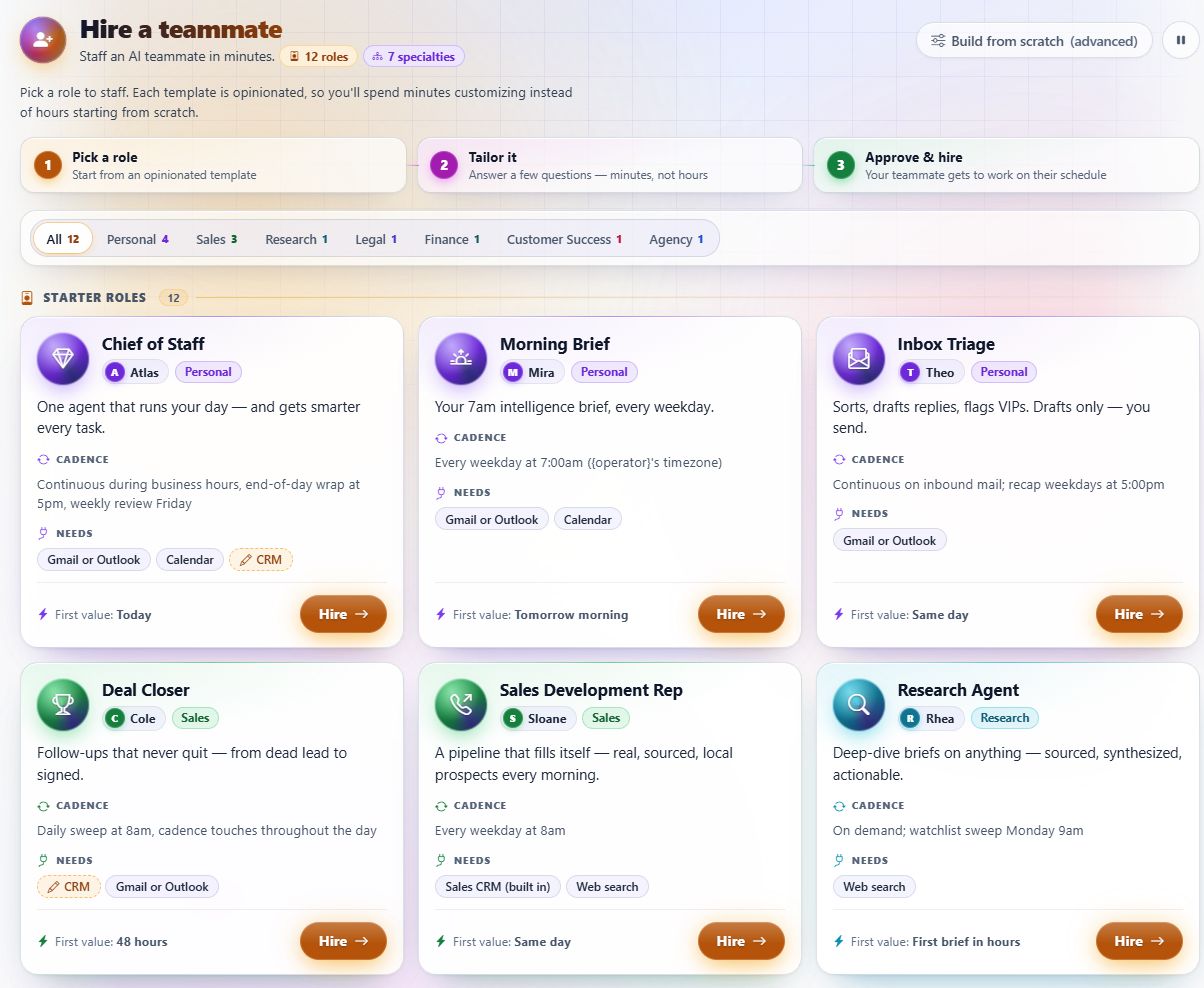
Executive assistance is a useful place to begin. Explore a role in the starter library, see its customizations, then meet your assistant on the Agent Floor. Guided setup defines the context, connections, and responsibilities it will carry.
Bring email and connected chats into the work, including Teams and Slack. Talk to your agent or let your Voice Rep handle real calls, with context close at hand.
Review a reply draft, turn an email into a task, or coordinate a meeting around real availability and working hours.
Recognize both sides of “I’ll get back to you.” Your agent proposes open loops for review, then keeps approved commitments and their follow-through in view.

Give it the routine handling. Set the boundaries and review points. Let the important decisions come back to you.
UNIFIED COMMUNICATIONS
Bring email, chat across your connected platforms, and real calls through your Voice Rep into one coordinated workspace. BizKey Agent Platform connects conversations to promises, responsibilities, approvals, and the next action.
INCOMING + OUTGOING
Read the request, understand the context, and prepare a considered reply. Keep the source message close to the next step.
TEAMS · SLACK · CONNECTED CHANNELS
Carry direct messages and team conversations into the work. Follow the discussion across the channels you connect.
REAL CALLS / VOICE REP
Call your agent, receive a check-in, or let a Voice Rep answer for the business, help callers, and make the follow-up.
Your agent connects the conversation to the next responsibility.
NO STONE UNTURNED
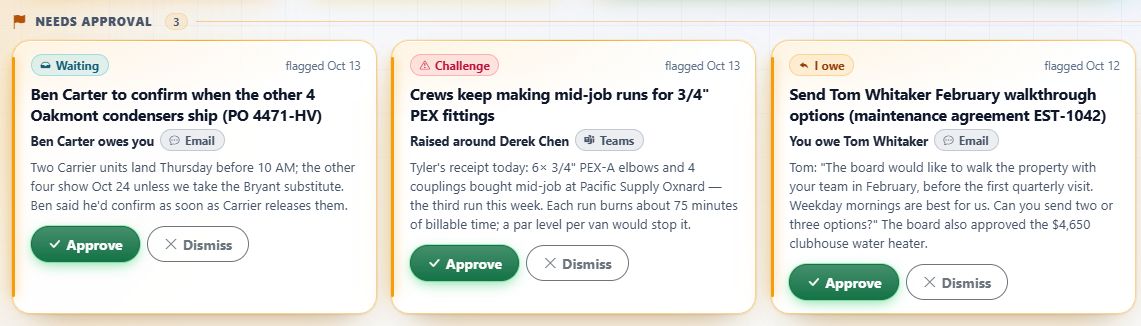
Your agent identifies promises and commitments in incoming and outgoing email and messages. It proposes open loops for review and approval, then tracks those commitments and brings unresolved follow-through back to your attention.
You, your team, or your company owe another party a next step.
“We’ll send the revised proposal by Friday.”
Your company owes the customer.
Proposed due date: Friday.
Another party owes you, your team, or your company a next step.
“We’ll confirm the delivery date tomorrow.”
The supplier owes your team.
Proposed follow-up: tomorrow.
Identify who owes what from the conversation, with its source context retained.
Bring the commitment and its suggested next step forward for review.
Check the details and decide which proposed commitments to track.
Keep approved commitments visible, with reminders and unresolved work brought back to you.
ACTUAL PRODUCT · DEMO WORKSPACE
 SEE THE PROPOSED OPEN LOOPS
Pending proposals retain their source and show who owes the next step. The agent can also surface a partial delivery and ask whether the loop is really closed.
See a partial-delivery reviewThe promise, its source, and the next step—kept together.
Explore your follow-throughHAND OVER THE DAILY HANDLING
Meetings, messages, calls, travel, customer questions, and sales follow-through. Start with a responsibility, then agree on the connections, permitted actions, and review points that support it.
“Find a time. Book the meeting.”
“Send the reply. Keep the context.”
“Place the call. Carry the conversation.”
“Find and book my flight.”
“Help them find the answer.”
“Keep sales moving.”
“Bring me the decisions that need me.”
Illustrative requests. The workflows enabled for your team depend on the platform plan, connected services, authority you grant, and review points agreed during setup.
Your Front Desk Agent
With the agreed voice and phone setup, give your company a front desk agent on a real number. Let it answer questions, book appointments, and help callers reach the right next step. You can call your agent, too.
ANSWERS. APPOINTMENTS. HANDOFFS.
Set up the agent to answer your company’s phone line, help callers from a curated reference library, book appointments, and hand over conversations that need your team.
You choose the number, knowledge, connected tools, and handoff points.
Explore the calls you could hand overFROM THE PRODUCT / PHONE SETUP
Connect a real number to a rep so incoming calls reach the agent.
 VIEW THE PHONE SETUP
FROM THE PRODUCT / REFERENCE LIBRARY
Give the rep curated guides and common answers for product or technical questions.
 VIEW THE REFERENCE LIBRARY
PROACTIVE ASSISTANCE
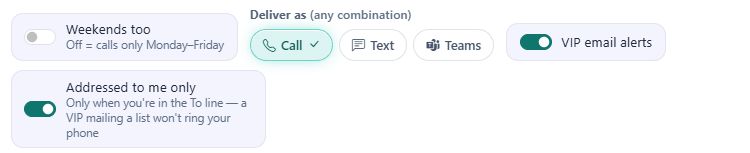
Choose a spoken check-in, a call when a VIP emails, or a reminder in the app. Set the moments that deserve your attention.
An illustration of the experience. Choose a moment to explore.
CHOOSE WHAT REACHES YOU
Choose VIP senders and limit alerts to messages addressed directly to you. When that rule matches, your rep calls.
FROM THE PRODUCT / RECORDED ACTIVITY
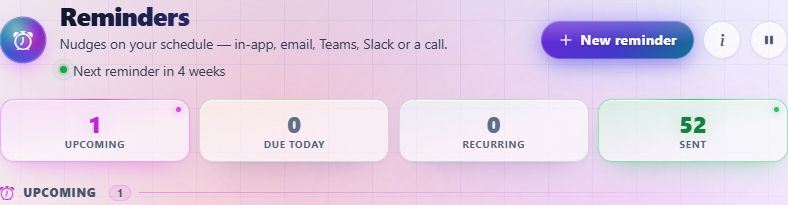
Actual activity and reminder history show creation and in-app delivery.


This captured reminder records delivery across all three channels.

THE WIDER PLATFORM
Executive assistance, business calling, sales, and marketing share the same platform. Carry follow-through into opportunities, content, and recurring work, with features and connections matched to your setup.
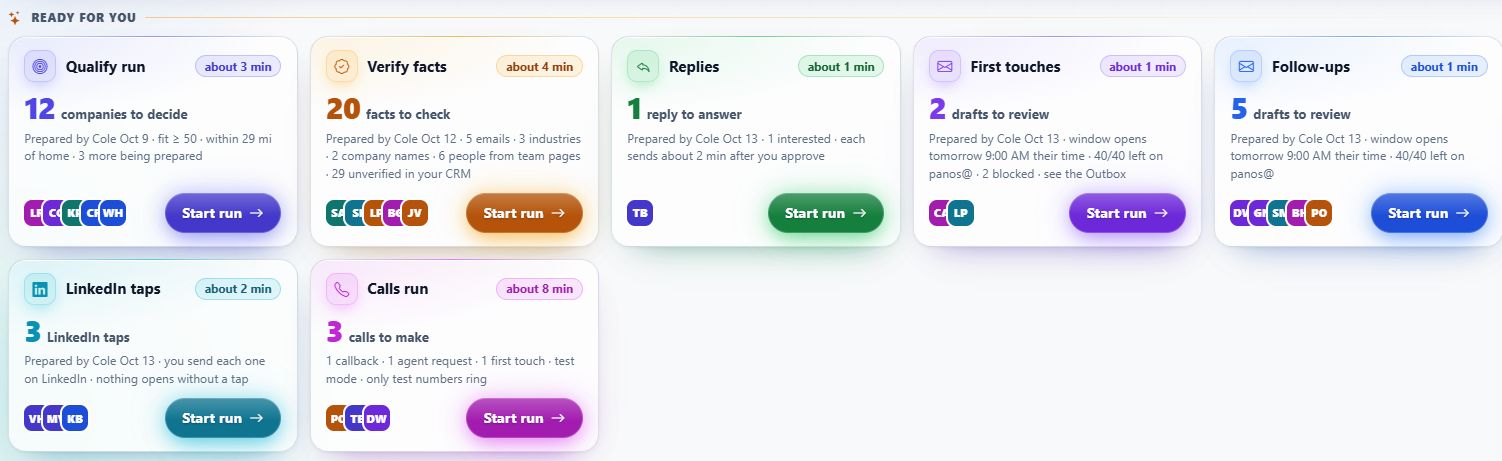
PREPARED FOR YOUR NEXT DECISION
Keep follow-ups, calls, replies, and qualification work in view. Sequences add an email and LinkedIn cadence, with each sequence draft waiting for your approval.
FOLLOW-THROUGH THAT REACHES YOU
Reminders can reach you in the app, by email, in Teams or Slack, or with a call. This workspace has recorded sent reminders.
 VIEW THE PRODUCT DETAIL
 A CADENCE FOR THE RELATIONSHIP
Prepare a multi-step email and LinkedIn cadence. Each message is drafted for your approval, so the relationship keeps its context and your judgment stays close.
 VIEW THE PRODUCT DETAIL
 Actual product screens. Values and queue states reflect the moment of capture.
YOUR DAY, WITH YOU
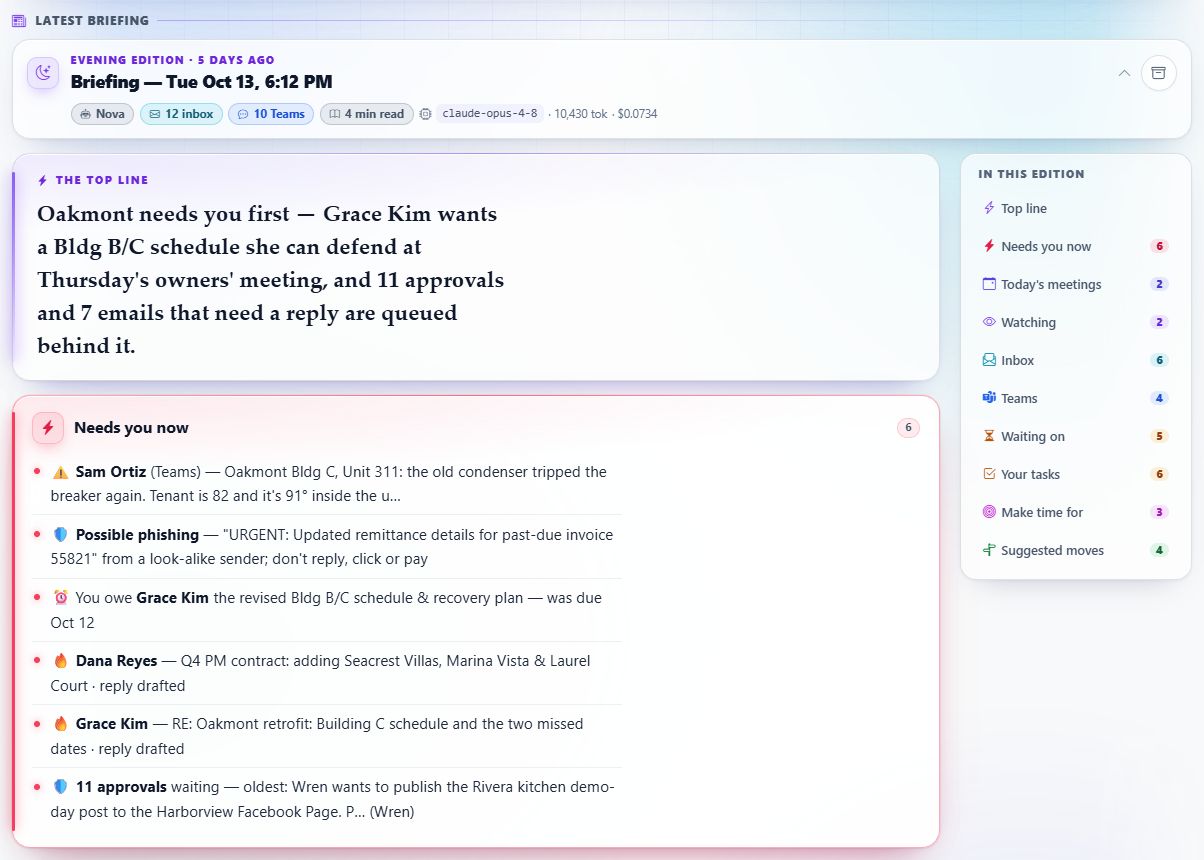
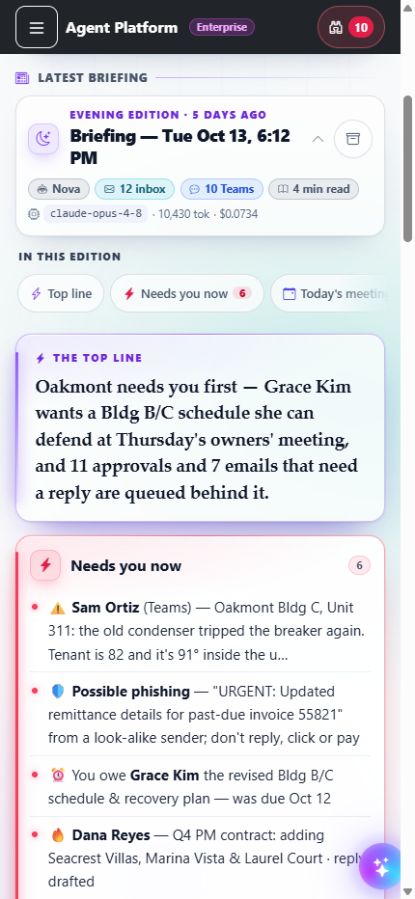
Read the briefing. See what needs you. Review the next action with its context close at hand—even when you’re away from your desk.
BRIEFINGS
Start with the top line, then open the priorities that need your attention. Your briefing brings the work into focus.
 LOOK INSIDE BRIEFINGS
APPROVALS
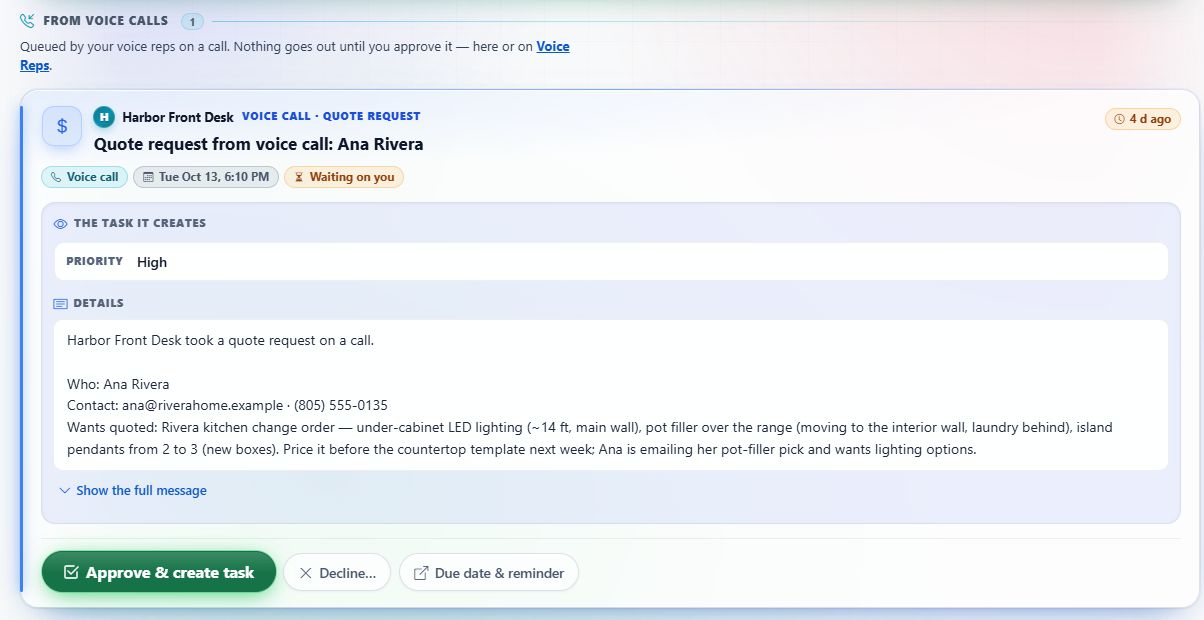
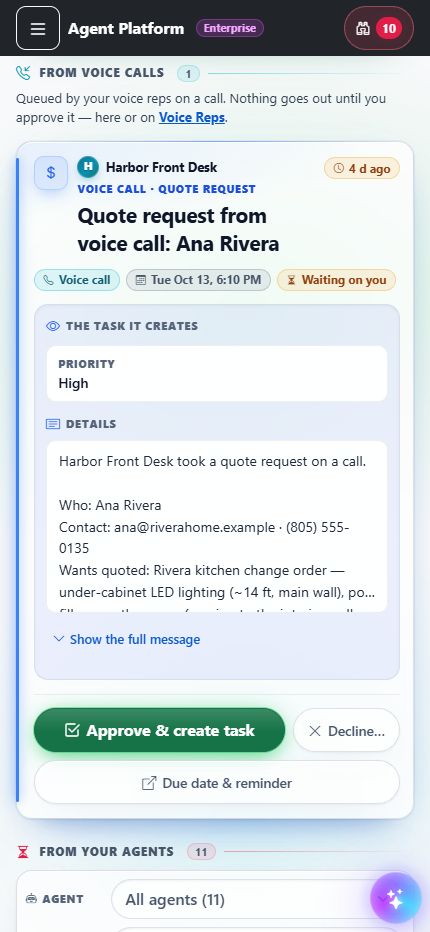
Inspect the proposed action and the context behind it. At your review point, decide what should happen next.
 LOOK INSIDE APPROVALS
COMMAND VIEW
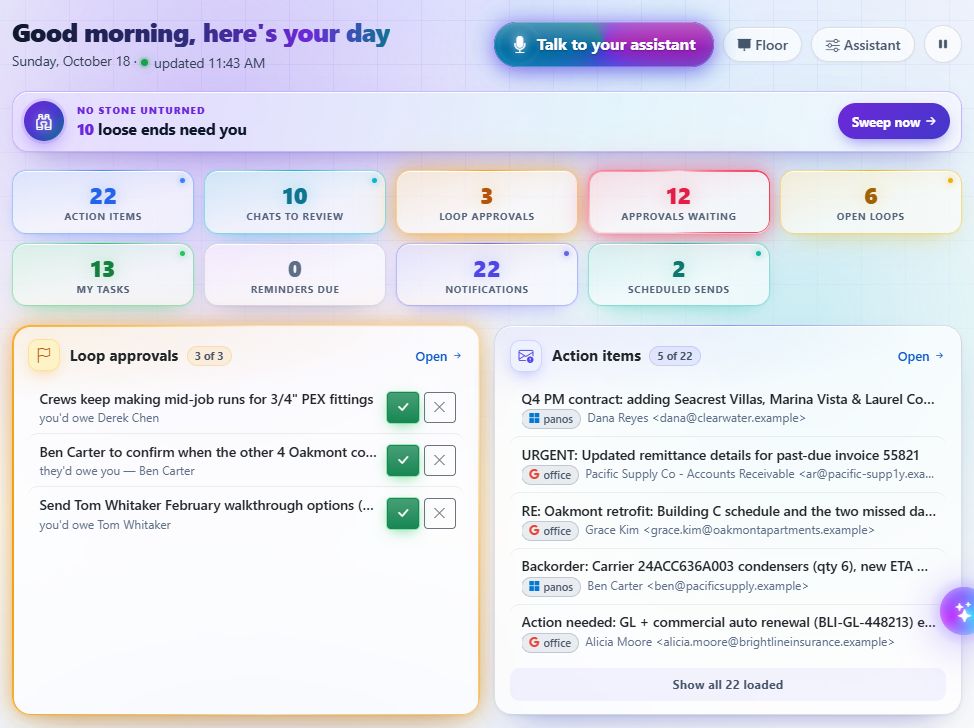
Bring priorities, action items, and open work together, then go straight to the detail that matters.
KEEP THE BUSINESS SHOWING UP
The details continue beyond the inbox. Give your marketing a recognizable style and a place to plan the work.
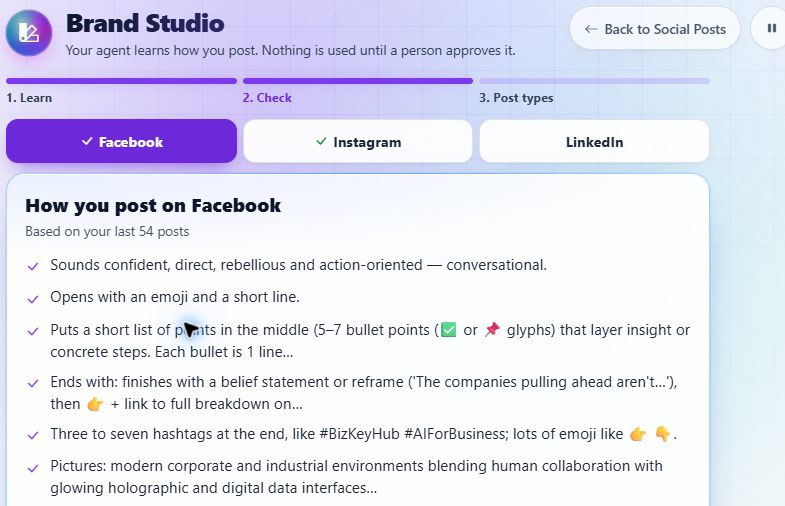
Brand Studio learns how you post by channel: tone, structure, hashtags, and picture style. Check what it learned before it is used.
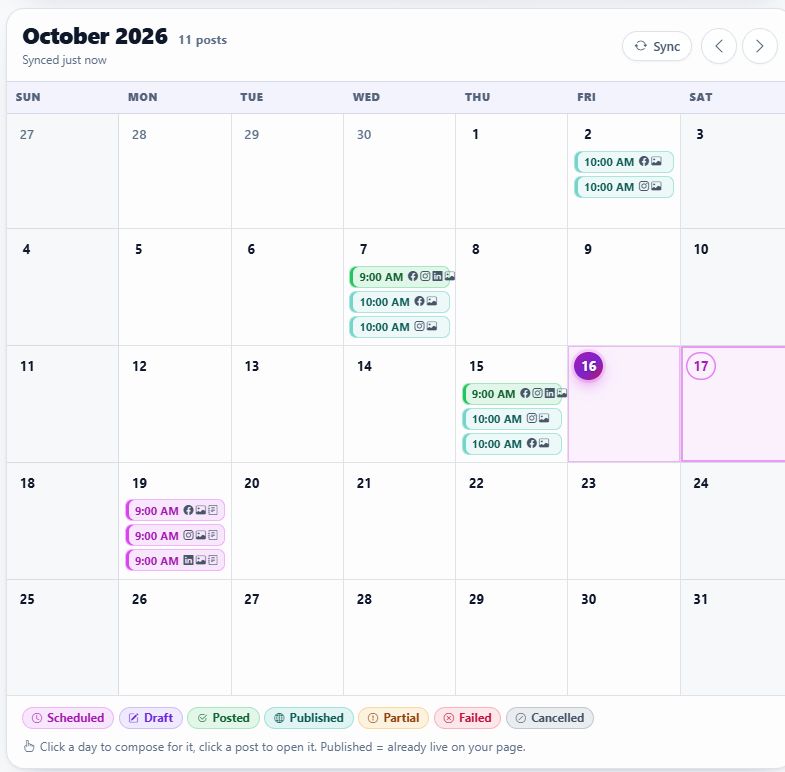
See the learned styleSee scheduled and published Facebook, Instagram, and LinkedIn posts together. Review agent drafts and choose when they go out.
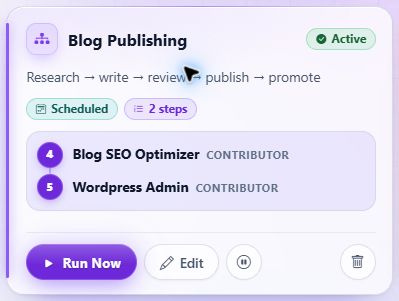
See the social calendarChain agents into a workflow with ordered steps and a trigger. The captured blog workflow connects a content agent with a publishing agent.
See the configured workflowTHE TEAM BEHIND THE WORK
The starter library offers 12 roles. Begin with a familiar responsibility, then explore the information, connections, cadence, and review points that role needs.
Explore the starter lineupYOUR EXPERTISE, EXTENDED
Build AI into the way your business works. Give each agent a clear responsibility, the right business context, and the review points you choose.
Teach your agents how the business works. Shape their responsibilities and review points. Keep your expertise at the center as you grow with AI.
Explore your AI teamCONTROL & SCALE
Choose the intelligence, see what it costs, and decide how your information is handled. Build the setup around your business.
Choose a workspace default, enforce it when needed, or match supported models to the work. See the model, tokens, and cost behind each AI call.
Mask configured names, contact details, company or project references, and financial figures before model requests. Choose where redaction applies.
Explore running the application on servers or infrastructure you control. Confirm separately where selected model, voice, and connected-service providers process requests.
START WITH THE WORK
Begin with the jobs your team needs: executive assistance, business calls, sales follow-through, or marketing. Then choose the features, agent capacity, seats, and usage terms that fit. MSP and consultant options remain available for those supporting clients.
See how to get started| Plan | AI agents | User seats |
|---|---|---|
| Starter | 1 | 1 |
| Basic | 3 | 1 |
| Pro | 100 | 5 |
| Business | 1,000 | 25 |
| MSP / Consultant | 1,000 | 50 |
| EnterpriseCustom terms | Unlimited | Unlimited |
A GUIDED START
Start with the responsibility you want to hand over. We’ll demonstrate the relevant workflows, discuss your connections and review points, and agree on the plan and setup that fit your team.
Explore executive assistance, business calling, sales, or marketing through the workflows that matter to your team.
Agree on software access, connections, configuration, permitted actions, review points, and the costs involved.
Configure the agreed scope and introduce your team to the everyday handling and decisions that come back to them.
Add responsibilities, connections, or capacity when they serve a useful next step for your business.
CLEAR BEFORE YOU COMMIT
Three parts of the agreement, each with its own scope.
Access to BizKey Agent Platform, with the agreed features, capacity, seats, and usage terms. The plan defines the software scope.
Agreed connections, configuration, review points, and onboarding. BizKey Services can provide assessment, implementation, and systems integration.
Explore implementationSeparately agreed monitoring, maintenance, and improvement where needed. Its scope and terms are discussed alongside your needs.
Model usage, calling services, and hosting costs are confirmed as included or additional before you commit. Feature access, connections, and deployment options depend on the agreed plan and configuration.
The Master Key Method guides BizKey’s service delivery. You do not need to purchase all five stages to adopt the platform. Broader architecture and integration work is separately scoped and may use BizKey Agent Platform when appropriate.
Enterprise AI Architecture & IntegrationA CLOSER LOOK
BizKey Agent Platform is BizKey’s own software for AI assistants, unified communications, business calling, and follow-through. BizKey owns the software, and BizKey Hub is the parent brand. The platform connects conversations to responsibilities, prepares next steps, and brings important decisions back to your team. This is its marketing introduction; the application and customer login are separate.
Request a platform walkthrough and choose a useful starting point: executive assistance, business calls, sales, or marketing. We’ll demonstrate relevant workflows, discuss your connections and review points, and agree on the plan and setup. Guided onboarding follows the agreed scope, with room to expand when useful. Your inquiry is a request for a conversation, not a confirmed booking.
No. You can adopt the platform through a demo and guided setup without purchasing a full consulting engagement or all five stages of the Master Key Method. BizKey Services can provide assessment, implementation, integration, or managed support when your needs call for that separately agreed work.
The platform plan covers agreed software access, features, capacity, seats, and usage terms. Setup and integration cover the agreed connections, configuration, review points, and onboarding scope. Managed support is separately agreed monitoring, maintenance, and improvement where needed. Model usage, calling services, and hosting costs are confirmed as included or additional before commitment.
Feature access, agent capacity, seats, model choices, and deployment options depend on the plan and configuration. Email, chat, calendars, calling, social accounts, and other workflows need the relevant supported connections and setup. The permissions you grant and review points you choose also determine what can proceed. We confirm the workflows and controls enabled for your team during the walkthrough and setup discussion.
Use the review controls appropriate to each workflow. The product includes an approval queue, reply and sequence drafts, agent-proposed open loops, and review of learned brand style and social content. Proposed open loops can be approved or dismissed; a partly fulfilled commitment can be reviewed before closing it. During setup, agree on the connections, permissions, automation settings, and review points for each responsibility. The handling differs by workflow, so review requirements are confirmed for the actions you enable.
Enterprise AI Architecture & Integration is a BizKey Services engagement for broader work across systems, data, integrations, and deployment requirements. It may use BizKey Agent Platform when appropriate, and it is not automatically included in a software plan. The scope and support arrangements are agreed separately. Explore Enterprise AI Architecture & Integration.
Your executive assistant helps connect communications to action: email and chat handling, reply preparation, briefings, calendar coordination, real calls, document work, and commitment follow-through. It can identify a promise in a message, propose an open loop for review, and help track what your team approves. The important decisions come back to you.
Yes. Voice Reps includes scheduled spoken check-ins and optional calls when a chosen VIP emails. You can limit VIP alerts to messages addressed directly to you. Reminders also support call delivery alongside other channels. The rep, phone setup, schedule, and preferences determine which moments reach you.
Yes. A configured Voice Rep can receive calls on an assigned number, check real calendar availability, book appointments, capture leads, take messages, and hand off when needed. Give it a curated reference library for product-specific or technical questions. Outbound calling supports callbacks, follow-ups, and confirmations. Voice Reps requires its voice and phone setup; confirm its availability and service costs in the plan and setup agreed for your team.
It brings together email, chat across your connected platforms, and voice through your Voice Rep. The Unified Inbox supports Email, Teams, Slack, and Chats, with an attention stream, actionable items, and reply drafting. Voice Rep adds real inbound and outbound phone calls, including business answering and proactive check-ins. Configure the channels and services around how your team works.
No Stone Unturned puts your agent’s understanding of commitments to work. It identifies promises in incoming and outgoing email and messages—whether you, your team, or your company owe another party, or a next step is owed to you, your team, or your company. The agent proposes open loops for review and approval, then tracks those commitments and brings unresolved follow-through back to your attention. It can also surface a reply that only partly fulfills a commitment and ask whether the loop is really closed. The source context stays close, so you can understand what was promised and decide the next step.
It brings the pipeline and next best actions into view, with prepared qualification and fact-checking work. Sequences add multi-step email and LinkedIn cadences, with every message drafted for a person to approve. Together with open loops and reminders, that gives your team a way to keep follow-through visible as relationships develop.
Brand Studio learns channel-specific patterns from existing posts and presents them for a person to check. Social Posts combines agent drafts, composition tools, and a calendar of scheduled and published posts for Facebook, Instagram, and LinkedIn. The channels and publishing workflows available to your team depend on the supported connections and configuration.
Yes. Choose a workspace-wide default model and optionally enforce it. Models can also be matched to features and agent work. AI Activity shows the model, token use, and cost for each call; eligible plans add spend forecasting, savings views, and monthly budget alerts. Quiet hours provide another way to shape when background AI work runs.
Configure redaction of selected sensitive fields before prompts and context reach a model, and choose the workflows it covers. Identity values can be restored in returned text so drafts read normally; financial figures remain masked for you to fill in. Privacy settings also let you choose whether AI Activity retains prompt and response text or just usage metadata. Coverage depends on configuration; masking does not mean that all data always stays on your infrastructure.
Customer-controlled deployment is an option. A setup discussion can establish the servers, model providers, voice services, and integrations you want to use. Hosting the platform yourself and choosing where connected providers process requests are separate parts of that decision.
REQUEST A PLATFORM WALKTHROUGH
Choose a starting point. We’ll help you explore the workflows, plan, and setup for your team.
Choose a walkthrough focus:
Walkthrough focus: Executive assistant.
Request a platform walkthroughContinue to BizKey Hub’s inquiry form to propose a time or send a note. Your selected use case goes with you. A request is not a confirmed booking.